Projects made with the Cricut® Personal Cutting Machine, Cricut® cartridges
and Sure Cuts A Lot software. Includes free SVG files for downloading.

Thursday, March 11, 2010

Beautiful Blogger Award

I received the above award twice recently from Sabra at Sabra's Crafts and Gift Ideas and from Margie at ScrappinMargie.

Thanks Sabra and Margie! It's so nice to be acknowledged!

The rules of the award are:
1. Add a link and note of thanks to the person giving the award.
2. Pass the award on to 15 bloggers whose blogs you have recently discovered and like.
3. Share 7 things about yourself.

Seven things about myself:
1. My favorite foods are cheeseburgers, potato chips and pizza.
2. I have two elderly, but cute dogs that I love dearly.
3. I enjoy designing cards to cut with my Cricut in my spare time, and enjoy sharing SVG files.
4. I enjoy gardening.
5. I'm a New York Giants fan.
6. I hate to cook.
7. I like blues and jazz, especially John Coltrane and Ben Webster.

I will try to pass on this award as I discover new bloggers. Several of those to whom I would pass it along have already received it, so for now I'd like to give the award to:
1. Chrissy at Chrissy's Craftin' Corner
2. EINNEJ at einnej.typepad.com
3. Nicole at Confessions of a Cropaholic
4. Heidi at My Creative Escape

Saturday, March 6, 2010

Birdhouse Note Card with SVG Files


This blog has moved to
www.paperyoga.com


The birdhouse has a heart shaped opening with a little bluebird inside.

Spring is just around the corner, and I wanted to do Paper Yoga of something cute and happy. I have a ceramic birdhouse knickknack with a heart shaped opening sitting on top of an entertainment unit in my home which inspired this design.

Use 8-1/2" x 11" bright green card stock folded in half as the base card. Cut the tree from brown card stock and adhere to the base card, aligning the top and sides. Cut the birdhouse background from black card stock and adhere over the tree, aligning at the bottom of the card. Continue with the birds and flowers, and don't forget about the yellow flower centers and beaks for the birds! Finished card size is 5-1/2" x 8-1/2" and will fit into a standard 5-3/4" x 8-3/4" greeting card envelope.

Six SVG files provided (tree, black, birdhouse, flowers, birds and yellow). The SVG files can be cut using the Sure Cuts A Lot software and a Cricut® cutting machine.

Download SVG files below.

Sunday, February 28, 2010

Mad Hatter & Son of Mac with SVG File


This blog has moved to
www.paperyoga.com


Today I post a Cricut® double feature of sorts — it's called "Men in Black (Hats)."

That's the good news.

The bad news is that I'm only providing one of the images as an SVG file download.

Tim Burton's Alice in Wonderland from Walt Disney Pictures is opening this Friday, March 5th. I'm not much of a "movie person," but I am anxious to see this one. I'm mostly interested in seeing the make-up, the costumes and the set design, but I'm sure that I'll be entertained (and probably confused).

I become mesmerized every time I see a picture of Johnny Depp as the Mad Hatter on television or on the 'net (also saw the poster at Wal-Mart yesterday and nearly bought it). It's such a haunting, graphic image, much like the illustrated version of Malcolm McDowell's Alex DeLarge character in A Clockwork Orange and Keith Legend's Joker character in The Dark Knight. These are images that one doesn't forget — ever. They're classic.

I decided to make a version of this image to cut on my Cricut just to see how it would come out. The card image at the top of this blog entry is a scan of the second version of this cut. The first version had the colors layered differently and had more detail in the right eye. It seems to work better with less detail. I'm quite happy with it and it has become my favorite project to date.

The other two characters (Alex and the Joker) are on my Cricut SVG file to-do list. They'll make for a weird trio of cards, won't they?

I saw an adaptation of Rene Magritte's "Son of Man" on someone's MacBook a few weeks ago, and realized that it would be fairly easy to make myself, since I own one of those amazing Cricut® cutting machines. I created an SVG file, made the cut using card stock and turned it into a card (because that's the nature of this blog), but the main intent is for the cut to be done in vinyl and used on an iBook, MacBook or Apple Studio Display.

One SVG file provided (I'm not including the Apple logo) and can be downloaded below. Adjust the size as needed for your particular hardware using the width of the apple as a reference point (the size provided seems to work well on a 17" MacBook Pro). The file can be cut using Sure Cuts A Lot software and a Cricut® cutting machine.

After a bit of research, I've convinced myself that the originator of this "Son of Mac" concept is Dan Kurtz at his (seemingly orphaned) Bricks Without Clay blog (way back in June 2006). He also provides an SVG file of his version of the decal, which you can download at his blog.

If anyone is dying to have this decal on their Mac, but doesn't have the ability to make it themselves, I found a few places selling them online for about $12...just google "Son of Mac decal." Please note that the SVG file provided here is for personal use only — do not use the SVG file provided to make decals to sell (Dan says that you can sell his version).

Click here to download Son of Mac SVG file

Tuesday, February 23, 2010

Mona Lisa Note Card with SVG Files


This blog has moved to
www.paperyoga.com


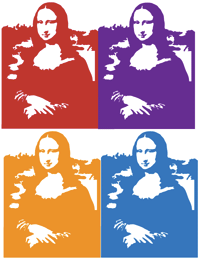
I made this card partly as a challenge, but mostly to amuse myself. Who would have thought that you could use your Cricut to make a copy of the Mona Lisa?

Use parchment colored 8-1/2" x 11" card stock folded in half for the base card. Cut the shadow background piece from maize colored card stock and adhere to the base card. Cut the main area from black card stock and adhere over the maize background. Please note that placement of the small black lips and nose area is critical — I suggest that you save the "throw away" portion of the face to use as a template when adhering this piece to the card. Finished card size is 5-1/2" x 8-1/2" and will fit into a standard 5-3/4" x 8-3/4" greeting card envelope.

You could have some fun with this file by cutting it out of different colors and assembling to make an Andy Warhol type collage (you'll have to hand cut and remove a portion of the border frame to get something similar to what's shown at right).

Two SVG files included (maize and black) provided and can be downloaded below. The SVG files can be cut using the Sure Cuts A Lot software and a Cricut® cutting machine.

Thursday, February 18, 2010

Claddagh Note Card with SVG Files


This blog has moved to
www.paperyoga.com

 
This Irish Claddagh design can be used as a friendship card for St. Patrick's Day. The Old Irish Blessing below is the ideal sentiment for the inside of the card.

Typically used as a design on rings, the Claddagh is a symbol which is rich in history and tradition. The original Claddagh ring was crafted in or near the fishing village of Claddagh in County Galway on the western coast of Ireland. The heart signifies love, the crown symbolizes loyalty, and the hands denote friendship.

The Claddagh ring has been given in Ireland as both a friendship ring and a wedding ring and is popular to this day. The motto of the Claddagh is "let love and friendship reign."

Use 8-1/2" x 11" dark green card stock folded in half. Cut the white oval with words and adhere to the green card stock. Cut the gold oval with small circles and crown and adhere the oval on top of the white oval. Cut the black oval and adhere within the gold oval. Finally, cut the red heart and attach the heart, crown and gold dots to the card. Finished card will fit into a standard 5-3/4" x 8-3/4" greeting card envelope.

Four SVG files (white, black, gold and red) provided and can be downloaded below. The SVG files can be cut using the Sure Cuts A Lot software and a Cricut® cutting machine.

LinkWithin

Related Posts with Thumbnails
 
Free SVG Files Free SVG Files by Paper Yoga