Projects made with the Cricut® Personal Cutting Machine, Cricut® cartridges
and Sure Cuts A Lot software. Includes free SVG files for downloading.
Showing posts with label SVG. Show all posts

Sunday, December 11, 2011

Christmas 2011


This blog has moved to
www.paperyoga.com

 
This Christmas card was designed so that it would be simple enough to cut and assemble in multiples. It took me about 3 hours to complete 20 cards, including the printing and attaching of the inside greeting. The SVG files provided are set up with multiple cuts of the same graphic, and are designed to fit on the small 6" x 12" cutting mat.

Cut as many wreaths as you need using bright green card stock, an equal quantity of bows using neon pink card stock, an equal quantity of the word "JOY" using neon orange card stock, and an equal quantity of the word "PEACE" using process blue card stock. Spray the backs of all pieces with spray glue. Use 8-1/2" x 11" black card stock folded in half for the base of the cards. Attach all of the wreaths first, then the bows and then the words "PEACE" and "JOY."


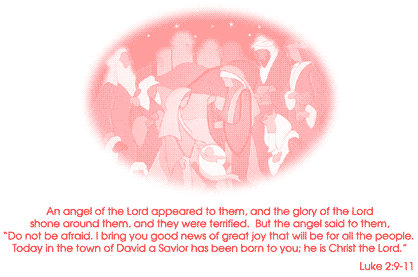
A PDF file of the inside greeting shown above is included with the SVG files. Print as many of the inside greeting as you need. If printing on 8-1/2" x 11" paper, you should cut 1/2" from all sides of the paper so that the inside greeting is 7-1/2" x 10".

Fold the inside greeting pages in half. Use a glue stick to put a small dot of glue on the back side of each of the top 2 corners of the inside greeting, and on the back top center below the fold. Carefully place the folded inside greeting into the folded outside card and press down to adhere the greeting to the inside of the card. Finished card will fit into a standard 5-3/4" x 8-3/4" greeting card envelope.

Four SVG files (wreath2, bow6, peace6 and joy9) and one PDF file of the inside greeting are provided and can be downloaded below. The SVG files can be cut using the Sure Cuts A Lot software and a Cricut® cutting machine.

Thursday, February 18, 2010

Claddagh Note Card with SVG Files


This blog has moved to
www.paperyoga.com

 
This Irish Claddagh design can be used as a friendship card for St. Patrick's Day. The Old Irish Blessing below is the ideal sentiment for the inside of the card.

Typically used as a design on rings, the Claddagh is a symbol which is rich in history and tradition. The original Claddagh ring was crafted in or near the fishing village of Claddagh in County Galway on the western coast of Ireland. The heart signifies love, the crown symbolizes loyalty, and the hands denote friendship.

The Claddagh ring has been given in Ireland as both a friendship ring and a wedding ring and is popular to this day. The motto of the Claddagh is "let love and friendship reign."

Use 8-1/2" x 11" dark green card stock folded in half. Cut the white oval with words and adhere to the green card stock. Cut the gold oval with small circles and crown and adhere the oval on top of the white oval. Cut the black oval and adhere within the gold oval. Finally, cut the red heart and attach the heart, crown and gold dots to the card. Finished card will fit into a standard 5-3/4" x 8-3/4" greeting card envelope.

Four SVG files (white, black, gold and red) provided and can be downloaded below. The SVG files can be cut using the Sure Cuts A Lot software and a Cricut® cutting machine.

Saturday, February 13, 2010

Tiger Note Card with SVG Files


This blog has moved to
www.paperyoga.com

 
The Zebra Note Card has become such a popular download that I decided to make the tiger image from the Scrap Coloring web site into a cutting file also. The illustration was done by Stephane at Scrap Coloring and is derived from a photograph of a Malayan Tiger by B cool on Wikipedia.

Someone on the Cricut Message Boards cut the Zebra SVG from vinyl and used it to make a "skin" for their laptop computer. This tiger image would also look great on a laptop (for a black laptop, use white vinyl and weed away the border and interior sections as one piece).

Start with 8-1/2" x 11" bright green card stock folded in half. Cut the tiger from black card stock and spray the back side with spray glue. Cut the tiger background shape from white card stock and adhere to the back of the tiger cut. Cut the square from bright green card stock (I used neon fluorescent green card stock) and adhere to the back of the tiger (the square SVG file is included, but not shown below — you can also cut the square by hand). Glue the assembled black, white and green tiger piece to the green card. Finished card will fit into a standard 5-3/4" x 8-3/4" greeting card envelope.

Three SVG files (tiger, white and square) provided and can be downloaded below. The SVG files can be cut using the Sure Cuts A Lot software and a Cricut® cutting machine.

Tuesday, February 9, 2010

Winter Magic Note Card with SVG Files


This blog has moved to
www.paperyoga.com

]
 
We've been having so much snow lately (and there's more on the way this evening) that I decided to make a card that shows the magical, simple beauty that can be found in nature after a snowfall...and I think that squirrels are cute and very entertaining!


This is the second version of this design – the first version was in a vertical format and had the squirrel's eyes and nose cut as separate pieces, which were so small that they were nearly impossible to work with. This redesign includes the eyes and nose in the cut pattern along with the black sky area, which makes the assembly of this card quite easy. The original design also included a shadow and footprints for the squirrel, and I might add those at some point in the future.

Use 8-1/2" x 11" white card stock folded in half. Cut the black sky and attach to white card stock. Cut the squirrel using gray card stock, and position so that the black eyes and mouth show through on the squirrel's face. Finished card will fit into a standard 5-3/4" x 8-3/4" greeting card envelope.

Two SVG files (black and squirrel) provided and can be downloaded below. The SVG files can be cut using the Sure Cuts A Lot software and a Cricut® cutting machine.

Thursday, February 4, 2010

Celebrate! Card with SVG Files


This blog has moved to
www.paperyoga.com


I had to do some Paper Yoga to CELEBRATE! my winning of a Gypsy from Nicole at the Confessions of a Cropoholic blog.
Thanks again, Nicole! Thanks again Provo Craft!

Nicole does some beautiful blog designs at reasonable prices - The Pixel Boutique - and she always seems to be giving something away on one of her blogs. I also bought a new cartridge (Destinations) for my Gypsy to celebrate some more!

The idea for this card came from a silkscreen print by pop artist Romero Britto.
I used fluorescent neon yellow card stock for the wine bottle label and words. The yellow color really POPS when surrounded by the black outline. Purple card stock was used for the wine and heart.

Use white 8-1/2" x 11" card stock folded in half for the base card. Cut all of your pieces, spray the back side of the black outline with spray glue, and then attach the yellow wine label to the back. Next, attach the purple wine to the back, as well as the purple flower. Attach this entire assembled piece to the white card stock and then attach the yellow words and yellow flower center to the front. Finally, attach the two black circles (that surround the flower centers) to the front. Finished card size is 5-1/2" x 8-1/2" and will fit into a standard 5-3/4" x 8-3/4" greeting card envelope.

Three SVG files included (purple, yellow and black) provided and can be downloaded below. The SVG files can be cut using the Sure Cuts A Lot software and a Cricut® cutting machine.

Saturday, January 30, 2010

Mardi Gras Mask with SVG Files


This blog has moved to
www.paperyoga.com


The Mardi Gras parades have started in New Orleans and the Saints are going to the Super Bowl! Laissez les bon temps rouler! Throw me somethin' mista!
Cuttlebug and Cricut
are wearing their
Mardi Gras masks.
They're the
Kricut Krewe!
This card can be used as a note card or as a table decoration. Purple, green and gold (golden yellow is often substituted) are the traditional colors of Mardi Gras, so it's best for you to use these colors.

Use 8-1/2" x 11" white card stock folded in half. Cut the purple mask and attach to the card so that the top 1/2" of the mask floats above the crease of the card. Cut the yellow, green and red and place onto the card as shown. You can cut off the top of the mask or score and fold so that the card will fit into a standard 5-3/4" x 8-3/4" greeting card envelope.

Four SVG files (purple, green, yellow and redlips) provided and can be downloaded below. The SVG files can be cut using the Sure Cuts A Lot software and a Cricut® cutting machine.

Wednesday, January 27, 2010

New York Skyline Note Card with SVG Files


This blog has moved to
www.paperyoga.com

 
Use 8-1/2" x 11" white card stock folded in half. Cut the blue background and atttach to white card stock. Cut the black skyline with border and words and attach over the blue background. Finished card will fit into a standard 5-3/4" x 8-3/4" greeting card envelope.

Please note that the blue background does not get centered on the card, and you should place the center of the blue approximately 1/4" above the center of the white card stock to adjust for the words at the bottom of the black overlay (the top of the blue should be about 1" from the top of the card).

This cut would also be nice on a memory page made for a trip to New York.

Two SVG files (blue and skyline) provided and can be downloaded below. The SVG files can be cut using the Sure Cuts A Lot software and a Cricut® cutting machine.

Friday, January 22, 2010

Gift Card Holder with SVG Files


This blog has moved to
www.paperyoga.com

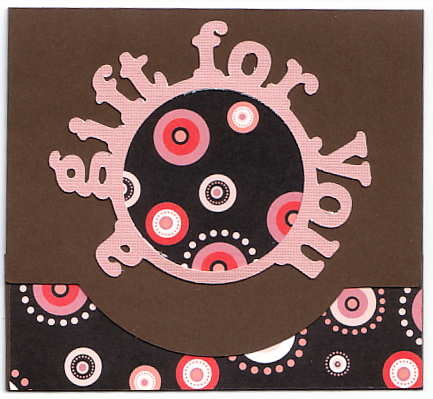
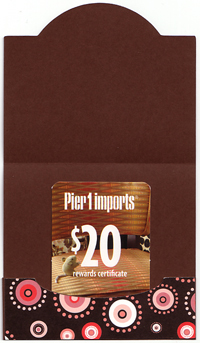
Here's a pattern for a typical sized gift card holder that can be cut using a Cricut® Personal Electronic Cutter (or any of the other Cricut machines) and Sure Cuts A Lot software. The pattern size is "maxed out" at 5-1/2" so placement of the pattern on the Sure Cuts A Lot "mat" is somewhat critical. Once you've cut the basic pattern, you'll need to score the tabs and the bottom flap. Score the tabs first, and then adhere the patterned inside card section to the base before scoring the bottom flap. The holder should be scored again at 3-3/4" from the bottom (with flap folded up) to form the top overlay. Glue the tabs to the card and decorate the front with the circle and words.
The gift card can placed into the holder either vertically or horizontally (as shown at right). I'll be designing more of these in the future, and already have an idea for one with cut out holes for a ribbon or other closure at the bottom. Three SVG files (base pattern, words and pieces for the patterned paper) provided. Download SVG files below.

Tuesday, January 19, 2010

Zebra Note Card with SVG File


This blog has moved to
www.paperyoga.com

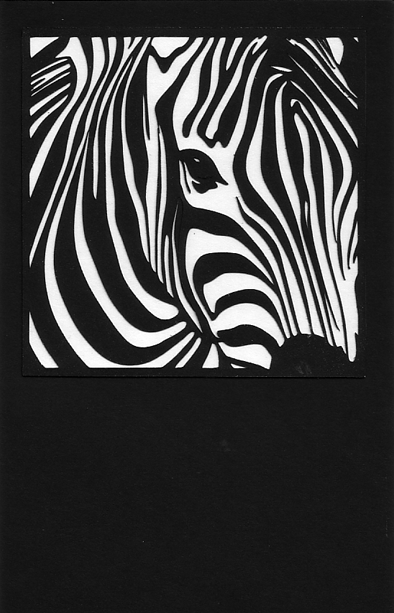
The idea for this card came from the Scrap Coloring web site, which I found by reading the Clever Someday blog. Scrap Coloring has a wide selection of SVG files that are perfect for tweaking into SVG's for use with your Cricut. The zebra image caught my eye, so I did a screen capture of the image and brought it into Adobe Illustrator for editing into an SVG that would work well with the Silhouette Cameo and Sure Cuts A Lot software. This zebra image was created by DragonArtz and licensed under the Creative Commons Attribution-Noncommercial-Share Alike 3.0 United States license. Any images of this zebra that you save or print are therefore licensed under the same license. Many thanks to DragonArtz for drawing this beautiful zebra and making it available for others to use! Thanks to Stephane at Scrap Coloring for providing me with the licensing details for the zebra image. Use black 8-1/2" x 11" card stock folded in half. Cut the zebra, glue it to white card stock, cut the white card stock to the size of the zebra and glue to the black card. Finished card size is 5-1/2" x 8-1/2" and will fit into a standard 5-3/4" x 8-3/4" greeting card envelope. Download SVG file below.

Friday, January 15, 2010

Valentine Heart with SVG Files


This blog has moved to
www.paperyoga.com


An easy Valentine's Day card.

Use 8-1/2" x 11" card stock folded in half. Finished card size is 5-1/2" x 8-1/2" and will fit into a standard 5-3/4" x 8-3/4" greeting card envelope.

Three SVG files provided (love, white heart and pink heart). The SVG files can be cut using the Sure Cuts A Lot software and a Cricut® cutting machine. Use the smaller heart that is removed from the lower white heart on top of the pink heart.

You should be able to find nice bright pink neon cardstock in the same aisle as mat board and poster board at your favorite craft supply store. I found a pack of 5 assorted color 11" x 14" sheets for about $1.89.

Download SVG files below.

Tuesday, January 12, 2010

LOVE Card with SVG Files


This blog has moved to
www.paperyoga.com


A very easy Valentine's Day card or note card for anyone.

Use 8-1/2" x 11" card stock folded in half. Finished card size is 5-1/2" x 8-1/2" and will fit into a standard 5-3/4" x 8-3/4" greeting card envelope.

Two SVG files provided (love and letter o). The SVG files can be cut using the Sure Cuts A Lot software and a Cricut® cutting machine. Download SVG files below.

Saturday, January 9, 2010

Flowers with SVG Files


This blog has moved to
www.paperyoga.com


Original design.

Elements designed to use negative space. Cut 4 flowers and 4 squares. Background color will show through as flower centers and words.

Use 8-1/2" x 11" card stock folded in half. Finished card size is 5-1/2" x 8-1/2" and will fit into a standard 5-3/4" x 8-3/4" greeting card envelope.

You should be able to find nice bright pink and orange fluorescent neon cardstock in the same aisle as mat board and poster board at your favorite craft supply store. I found a pack of 5 assorted color 11" x 14" sheets for about $1.89.

Three SVG files provided (birthday, square and flower). The SVG files can be cut using the Sure Cuts A Lot software and a Cricut® cutting machine. Download SVG files below.

Friday, January 8, 2010

Cupcake Birthday with SVG Files


This blog has moved to
www.paperyoga.com

 
Original design.

Use 8-1/2" x 11" card stock folded in half. Cut bottom 2" from top half of card and paste patterned paper onto inside of card below. Finished card will fit into a standard 5-3/4" x 8-3/4" greeting card envelope.

Three SVG files (tan, brown and hot pink) provided and can be downloaded below. The SVG files can be cut using the Sure Cuts A Lot software and a Cricut® cutting machine.


Wednesday, January 6, 2010

Sunflower with SVG Files


This blog has moved to
www.paperyoga.com


Original design.

Use 8-1/2" x 11" card stock folded in half. Finished card will fit into a standard 5-3/4" x 8-3/4" greeting card envelope.

The circles in the center brown area are cut out and will show through as the flower color. Three SVG files (yellow, brown and green) provided and can be downloaded below. The SVG files can be cut using the Sure Cuts A Lot software and a Cricut® cutting machine.


Tuesday, January 5, 2010

Thank You with SVG Files


This blog has moved to
www.paperyoga.com


Thank you card created using the In My Garden cartridge. Elements used are the coneflower, leaves and butterfly.

The words "Thank You" were created in Adobe Illustrator and saved as an SVG file. The SVG file can be cut using the Sure Cuts A Lot software and a Cricut® cutting machine.

This card was done on 8-1/2" x 11" card stock folded in half.  2-1-2" was cut from right sde of top, and the words were attached to the inside right side of card. Finished card will fit into a standard 5-3/4" x 8-3/4" greeting card envelope.


LinkWithin

Related Posts with Thumbnails
 
Free SVG Files Free SVG Files by Paper Yoga